

I get this a lot: a business has spent months publishing content, maybe even invested in link building, and rankings just… haven’t moved. Traffic is flat. The phone isn’t ringing more than it was six months ago.
Nine times out of ten, when I look under the hood, the problem isn’t the content at all. It’s the foundation the content is sitting on. Search engines simply can’t crawl, understand, or index the site properly — so no amount of great writing above that broken foundation is going to matter much.
That foundation is what a technical SEO audit is designed to uncover. In this guide, I’ll walk you through exactly what a technical SEO audit is, why it matters, what it actually covers, and how to know whether your website needs one. No jargon for the sake of sounding clever — just a clear explanation of what’s really going on under your website’s hood.
What Is a Technical SEO Audit?

In plain English: a technical SEO audit is a structured review of how easily search engines can crawl, understand, index, and ultimately rank your website.
Think of it like a building inspection. A building can look beautiful on the outside — nice paint, good furniture — but if the foundation is cracked or the wiring is faulty, none of that matters long-term. A technical SEO audit is the inspection that checks the foundation, the wiring, and the plumbing of your website, rather than how nice the rooms look.
It’s not about opinions on design or writing style. It’s a factual, evidence-based review of the technical mechanics that determine whether Google can even find and properly evaluate your pages in the first place.
Why Technical SEO Matters
Here’s the thing that surprises a lot of business owners: technical issues don’t just cause minor problems — they can quietly cap your entire SEO potential, no matter how good everything else is.
Poor crawlability means search engines can’t efficiently find and process your pages, so some of your best content may never even get indexed.
Slow websites frustrate both users and search engines. Site speed is a direct ranking factor, and it also affects how much of your content Google bothers to crawl within a given session.
Indexing issues mean pages that should be ranking simply aren’t in Google’s index at all — invisible, no matter how good the content is.
Duplicate content confuses search engines about which version of a page to rank, often diluting the authority of both.
Poor user experience — confusing navigation, intrusive pop-ups, broken layouts — increases bounce rates, which sends negative signals back to search engines.
Mobile usability issues are particularly costly, since Google evaluates your site primarily through its mobile version, not desktop.
One thing I always tell clients: technical SEO isn’t glamorous, but it’s the multiplier on everything else you do. Good content on a technically broken site underperforms. Good content on a technically sound site compounds.
When Does a Website Need a Technical SEO Audit?
You don’t need to audit constantly, but certain situations make it worth prioritising:
- Before or after a website redesign — redesigns are one of the most common causes of sudden ranking drops I see
- A noticeable traffic decline with no obvious explanation
- Ranking losses across multiple pages at once, rather than one specific page
- Site migrations — domain changes, platform changes, or HTTPS migrations
- Launching a new website — starting with a clean technical foundation is far easier than fixing it later
- Poor Core Web Vitals scores flagged in Search Console or PageSpeed Insights
- Large ecommerce websites, where thousands of product and category pages multiply technical issues quickly
- Slow or inconsistent indexing of new pages
- Warnings appearing in Google Search Console — these are rarely something to ignore
If any of these sound familiar, that’s usually a sign it’s worth having someone properly look under the hood before investing further in content or local SEO.
What Does a Technical SEO Audit Include?
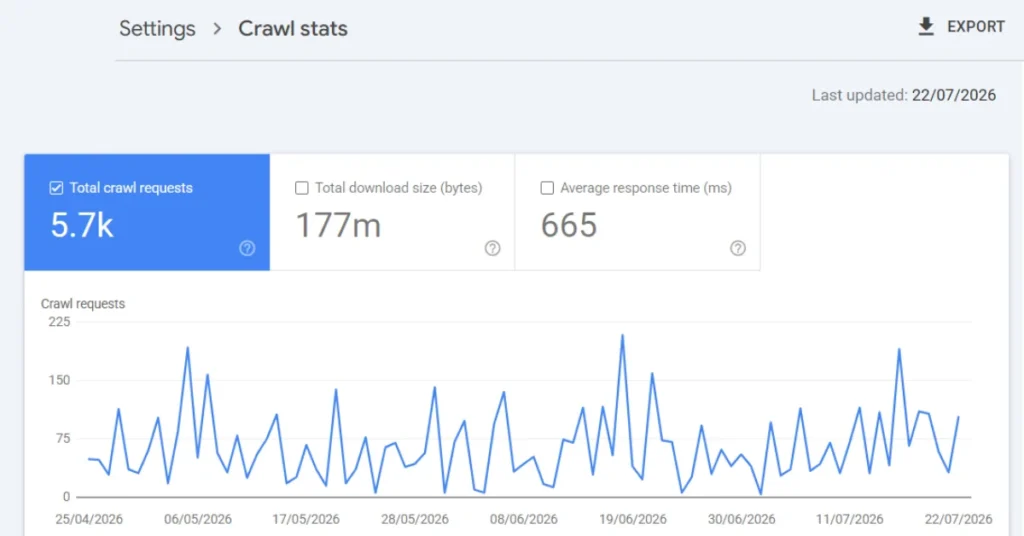
This is the part most people are curious about. Here’s what I actually look at, and why each piece matters.
Website Crawl Analysis
I start by crawling the site the way a search engine would, mapping out every page, how they connect, and where the structural problems are.
Indexability
Not every page that exists should be indexed, and not every page that should be indexed actually is. This checks which pages Google can and should be showing in search results.
Robots.txt
This small file controls what search engines are allowed to crawl. A single misconfigured line here can accidentally block an entire website from Google — I’ve seen it happen.
XML Sitemap
Your sitemap is essentially a map handed directly to search engines. If it’s outdated, incomplete, or full of broken URLs, it actively works against you.
Canonical Tags
These tell search engines which version of a page is the “main” one when duplicates or near-duplicates exist. Missing or incorrect canonical tags are one of the most common issues I find.
Redirects
Old URLs, changed page structures, and past migrations often leave behind messy redirect chains that waste crawl budget and dilute page authority.
Broken Links and 404 Errors
Every broken internal or external link is a dead end for both users and search engines — and a small signal of neglect that adds up across a site.
Internal Linking
How pages link to each other tells search engines what’s important on your site. Poor internal linking is one of the most underrated technical issues I see, even on otherwise well-built sites.
Website Architecture
How your site is structured — how many clicks it takes to reach any given page — directly affects how well search engines can understand your site’s hierarchy.
Mobile Friendliness
Since Google evaluates the mobile version of your site first, mobile usability issues have an outsized impact on rankings.
Core Web Vitals
Google’s specific measurements of loading speed, interactivity, and visual stability — a real ranking factor, not just a “nice to have.”
HTTPS
Basic, but still worth checking — an insecure site damages both trust and rankings.
Structured Data and Schema Markup
Structured data helps search engines understand exactly what your content represents — a review, a service, an FAQ — which can also unlock enhanced search result features.
Page Speed
Beyond Core Web Vitals specifically, overall load times affect both user experience and crawl efficiency.
Duplicate Content
Whether from technical issues or content structure, duplicate content spreads ranking potential thin across multiple URLs instead of concentrating it.
JavaScript SEO
Heavily JavaScript-reliant websites can render very differently for search engines than for users, sometimes hiding content from Google entirely without anyone noticing.
Image Optimisation
Unoptimised images are one of the most common causes of slow-loading pages, and missing alt text is a missed opportunity for both accessibility and search visibility.
The Technical SEO Audit Process
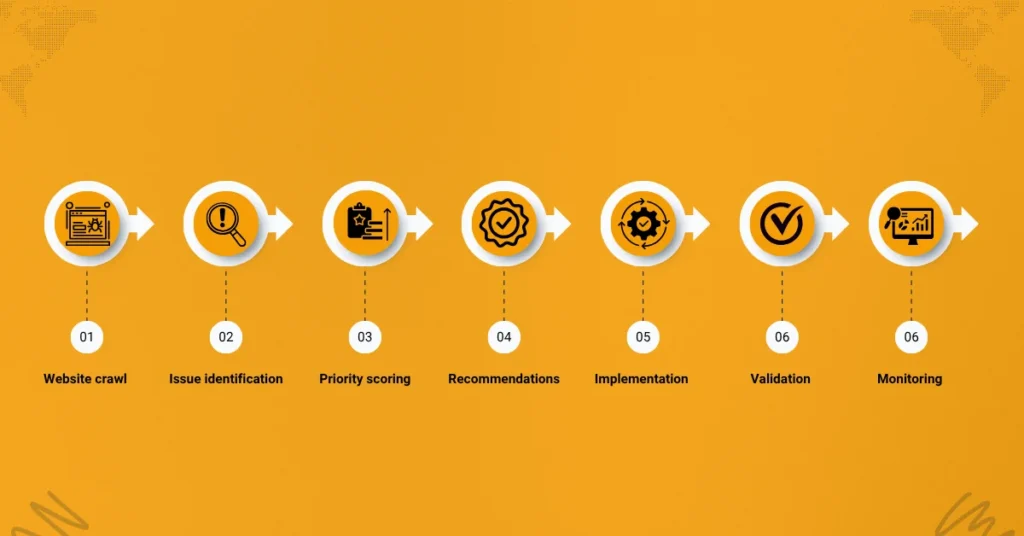
Here’s the general workflow I follow, start to finish:
Website crawl → Issue identification → Priority scoring → Recommendations → Implementation → Validation → Monitoring
The priority scoring step is where a lot of the real value sits. A raw audit tool might spit out 200 “issues.” Most businesses don’t need to fix all 200 at once — some are cosmetic, some are genuinely urgent. Part of the job is telling you which five actually matter this month, and which 195 can wait or be ignored entirely.
If you’d like this process applied to your own website, that’s exactly what a technical SEO audit with me involves — a full crawl, a prioritised list, and a plan you can actually action.
Common Technical SEO Problems I See
A few patterns show up again and again across the audits I run — not because every site is the same, but because these issues are easy to miss without a proper review:
- Poor internal linking, where important pages are buried several clicks deep with almost no internal links pointing to them
- Broken redirect chains left over from past site changes or migrations
- Missing or incorrect canonical tags, especially on ecommerce filter and sort pages
- Duplicate pages created unintentionally by CMS structure or URL parameters
- Large, unoptimised image files dragging down load times
- Weak Core Web Vitals scores, often caused by unnecessary scripts or unoptimised media
- Thin category or archive pages with little unique content
- Pages incorrectly excluded from indexing, sometimes from a leftover “noindex” tag after a site relaunch
- JavaScript rendering problems where content visible to users isn’t visible to search engines
If I were auditing a website today, these are the first areas I’d check before going any further — they account for a large share of the technical issues I find in practice.
How Long Does a Technical SEO Audit Take?
This depends heavily on site size and complexity:
- Small websites (under ~50 pages): typically a few days to complete a thorough audit
- Medium websites (50–500 pages): usually one to two weeks
- Large ecommerce websites (500+ pages, complex structures): can take several weeks, particularly where product variants and filtering create large numbers of URLs
Factors that extend timelines include site size, CMS complexity, the presence of multiple languages or subdomains, and how much historical technical debt has built up over time.
What Happens After the Audit?
An audit on its own doesn’t move a single ranking — it’s the starting point, not the finish line. What actually matters is what happens next:
Prioritising issues based on impact and effort, not just fixing whatever’s easiest first.
Implementation of the fixes, ideally with clear technical instructions your developer or WordPress team can act on directly.
Monitoring through Google Search Console to confirm issues are actually resolving as expected, not just assumed fixed.
Performance tracking in Analytics 4 to connect technical improvements back to real traffic and conversion outcomes.
Continuous optimisation, since technical SEO isn’t a one-time task — new issues can emerge with every content update, plugin change, or redesign.
Can You Perform a Technical SEO Audit Yourself?

Short answer: partially, yes — but with real limitations.
Tools like PageSpeed Insights, Google Search Console, and various crawler tools are genuinely useful and I use them constantly myself. But tools identify issues — they don’t tell you which ones are actually costing you rankings versus which are minor and safe to leave. That judgment call is where experience matters most, and it’s usually the difference between a 40-item report that overwhelms you and a five-item plan you can actually act on.
Final Thoughts
A technical SEO audit isn’t a checklist you tick off once and forget. It’s the process that reveals whether your website is actually capable of supporting everything else you’re investing in — content, SEO consulting, local visibility, and beyond.
If your rankings have stalled despite genuine effort elsewhere, technical SEO is usually the first place worth looking, not the last.
If you’d like an honest look at where your own website stands, I’m happy to walk you through what a proper audit would uncover for your site specifically — no generic report, just a clear, prioritised view of what actually matters. You can also head back to the Dubai SEO Consultant homepage to see the full range of ways I can help.
The Technical SEO Foundation Pyramid
Over time, I’ve found it useful to explain technical SEO to clients as a pyramid, where each layer depends entirely on the one beneath it:
Website Accessibility → Indexability → Performance → User Experience → Content → Authority
Here’s why the order matters. If search engines can’t access your site, nothing else matters. If pages aren’t indexable, your content strategy is irrelevant. If performance is poor, users bounce before they ever engage with your content. If the user experience is frustrating, even great content underperforms. Only once those four layers are solid does content actually get the chance to prove itself — and only then does link-earned authority compound on top of it.
The biggest misconception about technical SEO is that it’s separate from content or authority-building. It’s not. It’s the foundation everything else is built on — which is exactly why I always start here before recommending anything else.
Frequently Asked Questions
What is a technical SEO audit?
A technical SEO audit is a structured review of how easily search engines can crawl, understand, index, and rank your website, identifying issues that may be limiting your organic search performance.
Why is technical SEO important?
Technical issues can prevent even great content from ranking, since search engines need to properly access and understand a site before they can evaluate and rank its content at all.
How often should I audit my website?
As a general guideline, an annual audit is reasonable for most stable websites, with additional audits after major changes like redesigns, migrations, or noticeable ranking or traffic drops.
How long does a technical SEO audit take?
Timelines vary by site size — typically a few days for small sites, one to two weeks for medium-sized sites, and several weeks for large or complex ecommerce websites.
Can I audit my own website?
You can run basic checks using free tools like Google Search Console and PageSpeed Insights, but interpreting results and prioritising fixes correctly is where professional experience typically adds the most value.
What tools are used in a technical SEO audit?
Common tools include Google Search Console, PageSpeed Insights, Google Lighthouse, and dedicated website crawlers, though tools alone don’t replace the judgment needed to prioritise findings.
Does technical SEO actually improve rankings?
Yes — resolving technical issues often unlocks the ranking potential of content and authority that was already there but being held back by crawlability, indexing, or performance problems.
What is crawlability?
Crawlability refers to how easily search engines can navigate through and access the pages on your website — if a page can’t be crawled, it generally can’t be indexed or ranked.
What is indexability?
Indexability refers to whether a page that has been crawled is actually eligible to be stored and shown in search results, which depends on factors like canonical tags, noindex directives, and content quality.
What happens after a technical SEO audit?
The audit findings are prioritised, implemented, and then monitored through Search Console and Analytics to confirm the fixes are working and to track resulting performance improvements.